Senin, 10 Agustus 2009

Sejarah Keyboard

Sejarah dan Fungsi Keyboard Komputer

Kamu tahu kan apa yang dinamakan dengan Keyboard...??

Dahulu orang banyak yang menggunakan mesin ketik baik yang biasa maupun mesin ketik listrik. Nah, keyboard mempunyai kesamaan bentuk dan fungsi dengan mesin ketik. Perbedaannya terletak pada hasil output atau tampilannya. Bila kita menggunakan mesin ketik, kita tidak dapat menghapus atau membatalkan apa-apa saja yang sudah ketikkan dan setiap satu huruf atau simbol kita ketikkan maka hasilnya langsung kita lihat pada kertas. Tidak demikian dengan keyboard. Apa yang kita ketikkan hasil atau keluarannya dapat kita lihat di layar monitor terlebih dahulu, kemudian kita dapat memodifikasi atau melakukan perubahan-perubahan bentuk tulisan, kesalahan ketikan dan yang lainnya. Seperti juga “mouse”, keyboard dihubungkan ke komputer dengan sebuah kabel yang terdapat pada keyboard. Ujung kabel tersebut dimasukkan ke dalam port yang terdapat pada CPU komputer.

Keyboard adalah Alat input yang digunakan untuk mengetik informasi ke dalam komputer dan menjalankan berbagai intruksi atau perintah ke dalam komputer. Penciptaan keyboard komputer diilhami oleh penciptaan mesin ketik yang dasar rancangannya dibuat oleh Christopher Latham tahun 1868 dan banyak dipasarkan pada tahun 1877 oleh Perusahaan Remington.

Keyboard
komputer pertama disesuaikan dari kartu pelubang (punch card) dan teknologi pengiriman tulisan jarak jauh (Teletype). Tahun 1946 komputer ENIAC menggunakan pembaca kartu pembuat lubang (punched card reader) sebagai alat input dan output.

Bila mendengar kata “keyboard” maka pikiran kita tidak lepas dari adanya sebuah komputer, karena keyboard merupakan sebuah papan yang terdiri dari tombol-tombol untuk mengetikkan kalimat dan simbol-simbol khusus lainnya pada komputer. Keyboard dalam bahasa Indonesia artinya papan tombol jari atau papan tombol.


Pada keyboard terdapat tombol-tombol huruf A – Z, a – z, angka 0 - 9, tombol dan karakter khusus seperti : ` ~ @ # $ % ^ & * ( ) _ - + = < > / , . ? : ; “ ‘ \ | serta tombol-tombol khusus lainnya yang jumlah seluruhnya adalah 104 tombol. Sedangkan pada Mesin ketik jumlah tombolnya adalah 52 tombol. Bentuk keyboard umumnya persegi panjang, tetapi saat ini model keyboard sangat variatif.
Keyboard yang paling terkenal adalah keyboard QWERTY yang memiliki 101 buah key (tombol). Kebanyakan keyboard memiliki key yang disusun ke dalam bagian sebagai berikut :
A. Alphanumeric Key
B. Numerik Keypad
C. Function Key
D. Modifier Key
E. Cursor Movement Key.

Selain itu, dalam menggunakan aplikasi Ms. Office (khususnya MS. Word) ada beberapa tombol Keyboard yang mempunyai fungsi apabila dikombinasikan atau digabungkan dengan tombol lainnya, contoh seperti di bawah ini :
Ctrl + A = Select All
Ctrl + B = Bold
Ctrl + C = Copy
Ctrl + D = Font
Ctrl + E = Center Alignment
Ctrl + F = Find
Ctrl + G = Go To
Ctrl + H = Replace
Ctrl + I = Italic
Ctrl + J = Justify Alignment
Ctrl + K = Insert Hyperlink
Ctrl + L = Left Alignment
Ctrl + M = Hanging Indent
Ctrl + N = New
Ctrl + O = Open
Ctrl + P = Print
Ctrl + Q = Normal Style
Ctrl + R = Right Alignment
Ctrl + S = Save / Save As
Ctrl + T = Left Indent
Ctrl + U = Underline
Ctrl + V = Paste
Ctrl + W = Close
Ctrl + X = Cut
Ctrl + Y = Redo
Ctrl + Z = Undo
Ctrl + 1 = Single Spacing
Ctrl + 2 = Double Spacing
Ctrl + 5 = 1,5 lines
Ctrl + Esc = Start Menu

Secara fisik, keyboard terbagi atas 4 bagian, yaitu:

1. Keyboard Serial
Menggunakan DIN 5 male dan biasanya digunakan pada komputer tipe AT.

Port pada keyboard serial

2. Keyboard PS/2
Biasanya digunakan pada komputer ATX dan saat ini yang paling banyak dipergunakan. Pemasangan keyboard tipe ini harus dilaksanakan dengan cermat, sebab port yang dimiliki sama dengan port untuk mouse.

Port pada keyboard PS2 dan konektor pada motherboard

3. Keyboard Wireless
Sesuai dengan namanya, keyboard tipe ini tidak menggunakan kabel sebagai penghubung antara keyboard dengan komputer. Jenis koneksi yang digunakan adalah infra red, wifi atau bluetooth. Untuk menghubungkan keyboard dengan komputer, dibutuhkan unit pemancar dan penerima. Unit pemancar biasanya terdapat pada keyboard itu sendiri, sedangkan penerima biasanya dipasang pada port USB atau serial pada CPU.

Keyboard dan mouse wireless

4. Keyboard USB
Komputer terbaru saat ini sudah banyak yang mempergunakan jenis konektor USB yang menjamin transfer data lebih cepat

Konektor USB

Minggu, 09 Agustus 2009

Sejarah Monitor

Sejarah Monitor


Monitor komputer merupakan sejenis peranti persisian output yang berupaya memaparkan askara dan/atau imej, baik diam atau bergerak, yang dijanakan oleh komputer dan diproseskan oleh kad grafik.
Tedapat empat jenis Monitor, iaitu Monitor monokrom, Monitor warna, Monitor segerak berbilang, dan Monitor ELD (Elektro Luminescent Display). Setiap Monitor mempunyai ciri-ciri dan sejarah tersendiri.
Mutu Monitor tergantung kepada beberapa faktor. Yang terutama ialah bilangan piksel yang dipaparkan oleh skrinnya; lebih banyak pikselnya, lebih tajamnya teks dan grafik yang dipaparkan.
Pada awalnya semua monitor adalah dari jenis tiub sinar katod (CRT) sama seperti yang digunakan pada tiub televisyen, namun kini monitor jenis LCD semakin digemari kerana monitor LCD menggunakan ruang yang kecil, ringan serta lebih menjimatkan tenaga elektrik berbanding monitor CRT

Sejarah Monitor


Istilah "mod paparan" merujuk kepada ciri-ciri paparan komputer, khususnya bilangan warna maksimum dan peleraian imej maksimum (dalam piksel lintang dan piksel lajur). Terdapatnya banyak mod paparan yang boleh di dapati dalam sistem komputer peribadi pada hari ini.
Paparan komputer peribadi yang terawal merupakan Monitor monokrom yang digunakan untuk pemproses kata dan sistem komputer berdasarkan teks pada dekad 1970-an. Pada tahun 1981, IBM memperkenalkan sistem paparan Penyesuai Grafik Warna (CGA). Sistem paparan ini berupaya memberikan empat warna, dan mempunyai peleraian maksimum 320 piksels datar dan 200 piksel tegak. Walaupun CGA mencukupi untuk kegunaan permainan komputer yang mudah seperti permainan solitaire dan permainan dam, ia tidak mencukupi untuk pemprosesan kata, penerbitan atas meja ataupun penggunaan grafik yang canggih.
Pada tahun 1984, IBM memperkenalkan sistem paparan Penyesuai Grafik Tertingkat (EGA) yang dapat memberikan sehingga 16 warna yang berlainan dan peleraian sehingga 640 x 350. Ini memperbaiki kelihatannya berbanding paparan yang lebih awal, dan memungkinan pembacaan teks dengan mudah. Bagaimanapun, EGA tidak memberikan peleraian imej yang mencukupi untuk kegunaan-kegunaan tahap tinggi seperti reka bentuk grafik dan penerbitan atas meja. Mod ini kini sudah usang, walaupun ia kekadang masih boleh didapati di pemprosesan lama dan komputer peribadi di rumah kediaman.
Pada tahun 1987, IBM memperkenalkan sistem paparan Tatasusunan Grafik Video (VGA). Kini, ini telah merupakan piawai minimum yang dapat diterima untuk komputer peribadi. Peleraian maksimum tergantung kepada bilangan warna yang dipaparkan. Pengguna boleh memilih antara enam belas warna pada 640 x 480, ataupun 256 warna pada 320 x 200.
Pada tahun 1990, IBM memperkenalkan sistem paparan Tatasusunan Grafik Terluas (XGA) sebagai waris untuk paparan 8514/A. Versi yang berikut, iaitu XGS-2, memberikan peleraian 800 x 600 piksel dalam warna yang benar (16 juta warna) dan peleraian 1024 x 768 dalam 65,536 warna. Kedua-dua tahap peleraian imej ini mungkin merupakan jenis yang terpopular di kalangan individu dan perniagaan kecil pada hari ini.
Persatuan Piawai-Piawai Elektronik Video (VESA) telah mengasaskan antara muka pengaturcaraan piawai untuk paparan Tatasusunan Grafik Video Super (SVGA) yang digelarkan Sambungan BIOS VESA ("VESA BIOS Extension"). Lazimnya, paparan SVGA dapat mendukung palet sehingga 16 juta warna, tergantung kepada jumlah ingatan video yang tersedia dalam sesuatu komputer yang akan menghadkan bilangan warna yang dapat dipaparkan. Spesifikasi peleraian imej berbeza-beza. Pada umumnya, lebih besar skrin Monitor SVGA, lebih banyak piksel dapat dipaparkan secara datar dan tegak.


www.beritanet.com/search.php?...sejarah%20perkembangan%20monitor -

Sejarah Motherboard AMD

Sejarah Motherboard AMD

ASUS M4A785TD-V EVO Motherboard

Even though the formal release of the AMD 785G chipset is not set to occur until sometime in August, the first 785G motherboards have been shipping to retailers for weeks and one managed to find its way to our front door here at Legit Reviews. Meski rilis resmi dari AMD 785G Chipset tidak menetapkan sampai kadang-kadang terjadi pada bulan Agustus, pertama 785G motherboard telah pengiriman ke pengecer untuk satu bulan dan dikelola untuk menemukan cara-nya kita ke depan pintu di sini di Legit Review. Today, we have the ASUS M4A785TD-V EVO motherboard to take a peek at. Saat ini, kami telah ASUS M4A785TD-V EVO Motherboard untuk mengambil mengintip di. This socket AM3 motherboard uses the AMD 785G and SB710 chipsets and is packed full of features that one wouldn't expect on an entry level AMD motherboard that will range from $70-$90 if the price leaks are correct. Socket AM3 Motherboard ini menggunakan AMD 785G dan SB710 chipset dan dikemas penuh dengan fitur yang satu tidak akan mengharapkan masukan pada tingkat AMD motherboard yang akan berkisar antara $ 70 - $ 90 jika harga kebocoran sudah benar.
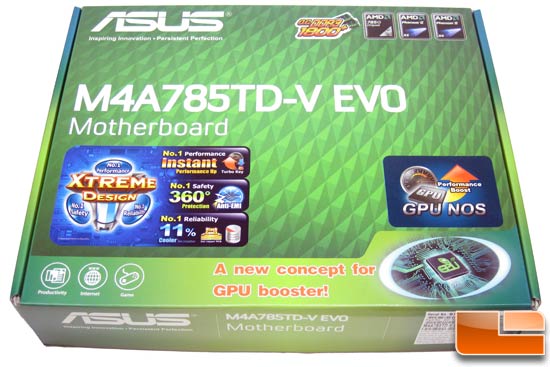
ASUS M4A785TD-V EVO Motherboard Box

For starters, the AMD 785G platform will be the first to feature highly anticipated ATI Radeon HD 4200 Graphics, which means that DirectX 10.1 gaming performance will be coming to IGP mainboards. For starters, AMD 785G platform yang akan menjadi satu untuk fitur sangat diantisipasi ATI Radeon HD 4200 Graphics, yang berarti bahwa kinerja gaming DirectX 10,1 akan datang ke IGP mainboards. That means that the AMD 785G platform will have better video performance than the AMD 780G chipset, which uses ATI Radeon HD 3200 Graphics. Itu berarti bahwa platform AMD 785G akan memiliki kinerja video yang lebih baik dibandingkan dengan chipset AMD 780G, yang menggunakan ATI Radeon HD 3200 Graphics. The title of being the world's fastest motherboard GPU still belongs to the ATI Radeon HD 3300 Graphics on the AMD 790GX motherboards, as the second number in AMD's IGP nomenclature dictates the performance level. Judul yang tercepat di dunia Motherboard GPU masih berada pada ATI Radeon HD 3300 Graphics pada motherboard AMD 790GX, karena angka kedua dalam tata nama IGP AMD dictates tingkat kinerja. That is why the Radeon HD 3 3 00 is faster than the Radeon HD 4 2 00. Itulah mengapa Radeon HD 3 3 00 lebih cepat dibandingkan dengan Radeon HD 4 2 00.
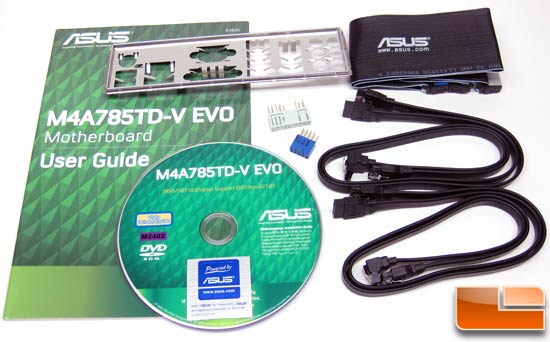
ASUS M4A785TD-V EVO Motherboard Retail Bundle

Inside the retail box one will find the bundle that comes with the ASUS M4A785TD-V EVO motherboard. Di dalam kotak eceran akan menemukan satu bundel yang dilengkapi dengan ASUS M4A785TD-V EVO Motherboard. ASUS includes four Serial ATA cables, one Ultra DMA 133/100/66 cable, the I/O shield, Q-Connectors, user manual, motherboard support DVD and a case badge. ASUS termasuk empat kabel Serial ATA, Ultra DMA 133/100/66 satu kabel, maka I / O perisai, T-konektor, user manual, Motherboard mendukung DVD dan kasus badge. The ASUS Q-Connectors allow you to hook up the front panel connectors to the supplied removable plug and then connect this plug onto the motherboard. ASUS Q-Connectors memungkinkan Anda untuk menghubungkan bagian depan panel konektor ke disertakan removable plug and plug kemudian menghubungkan ke motherboard. This is a life saver when assembling a system down in a case where space and light is at a minimum. Ini adalah kehidupan assembling saver ketika sistem down dalam kasus di mana ruang dan cahaya adalah minimal. The I/O panel is just the standard stamped metal one, which is a bummer as we really like the ASUS Q-Shield version that is designed to decrease any electromagnetic interference from escaping out of or into the chassis through this area. I / O panel hanya standar dicap satu logam, yang merupakan gelandangan seperti yang kita benar-benar seperti ASUS Q-Shield versi yang dirancang untuk mengurangi gangguan dari apapun electromagnetic keluar dari atau ke dalam chassis melalui daerah ini. It seems ASUS is planning on leaving that as a feature on their higher-end products. Sepertinya ASUS berencana akan berangkat pada bahwa sebagai satu fitur yang lebih tinggi pada produk-akhir.
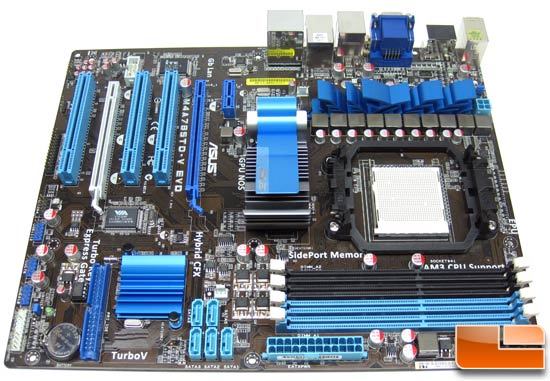
ASUS M4A785TD-V EVO Motherboard AMD 785G

As you can see from the image above the ASUS M4A785TD-V EVO is a full size ATX motherboard that features the AM3 processor socket by AMD. Seperti yang dapat Anda lihat dari gambar di atas ASUS M4A785TD-V EVO adalah ukuran penuh ATX motherboard yang memiliki fitur prosesor socket AM3 oleh AMD. The M4A785TD-V EVO uses Stack Cool 3+ and is part of the Xtreme Design initiative that ASUS is currently promoting. The M4A785TD-V EVO menggunakan Stack Cool 3 + dan merupakan bagian dari inisiatif yang Xtreme Desain ASUS saat ini sedang mempromosikan. The board has a very clean layout and features an 8+2 phase power design. AMD and ASUS asked us not to go into any more detail than what can be seen from pictures of the board, so we can only give you a brief overview of the M4A785TD-V EVO. This motherboard features SidePort Memory, which is an individual on-board DDR3 chip that acts as a memory buffer for the integrated Radeon 4200 graphics. Dewan sangat bersih dan tata letak yang fitur 8 phase power design 2. AMD ASUS dan kami tidak lagi masuk ke detail dari apa yang dapat dilihat dari gambar di papan, jadi kami hanya dapat memberikan gambaran singkat mengenai pelayanan yang M4A785TD-V EVO. SidePort Motherboard ini memiliki memori yang setiap on-board DDR3 chip yang berfungsi sebagai buffer memori untuk grafis terintegrasi Radeon 4200. Since the board has the Radeon 4200 graphics on-board it also sports ATI Hybrid CrossFireX technology. Papan karena memiliki Radeon 4200 grafis on-board juga olahraga ATI Hybrid CrossFireX teknologi.
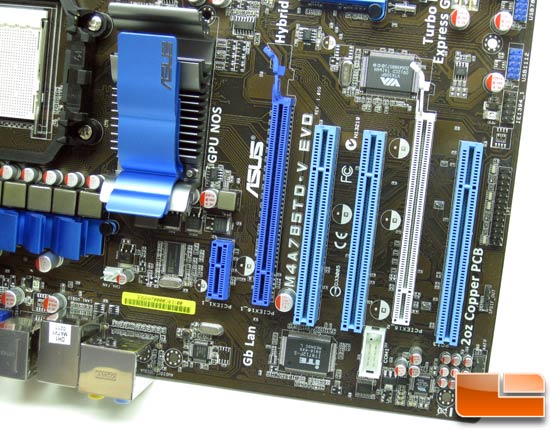
ASUS M4A785TD-V EVO Motherboard PCIe Slots

Expansion capabilities come in the form of three PCI slots, one PCI3 x1 slot and two x16 PCI-E 2.0 slots for those looking to run video cards in an ATI CrossFire configuration. Perluasan kemampuan datang dalam bentuk tiga slot PCI, satu PCI3 x1 dan dua slot PCI-E x16 slot 2,0 untuk melihat orang-orang untuk menjalankan video di dalam kartu ATI CrossFire konfigurasi. It should be noted that the blue PCIe 2.0 slot x16 operates at x16 mode and the gray PCIe 2.0 slot operates at x4 mode. Perlu dicatat bahwa biru 2,0 slot PCIe x16 beroperasi pada mode x16 dan abu-abu 2,0 slot PCIe beroperasi di mode x4.


The back I/O panel offers plenty of connectivity. Bagian belakang I / O panel menawarkan banyak konektivitas. The board features a single purple PS/2 combo port and a total of six USB 2.0 ports available on the I/O panel with more available on the board itself. Board satu fitur ungu PS / 2 port kombo dan total enam port USB 2.0 yang tersedia di I / O dengan panel yang tersedia di papan itu sendiri. Additional connectivity includes an optical S/PDIF port, a single eSATA port, a single IEEE 1394a Firewire port, a single RJ-45 Gigabit LAN port and the eight channel surround sound ports. Konektivitas tambahan termasuk sebuah optical S / PDIF port, sebuah port eSATA, satu port IEEE 1394a Firewire, satu RJ-45 Gigabit LAN port dan delapan saluran surround sound port. When it comes to video connections you have the 15-pin VGA port, DVI-D port and the HDMI port. Ketika datang ke video Anda memiliki koneksi 15-pin VGA port, DVI-D Port dan HDMI port. This motherboard is fully HDCP compliant, so it should be ideal for Blu-Ray playback or for any other protected content. Motherboard ini adalah sepenuhnya HDCP compliant, jadi harus ideal untuk Blu-Ray pemutaran atau untuk setiap konten yang dilindungi lainnya.
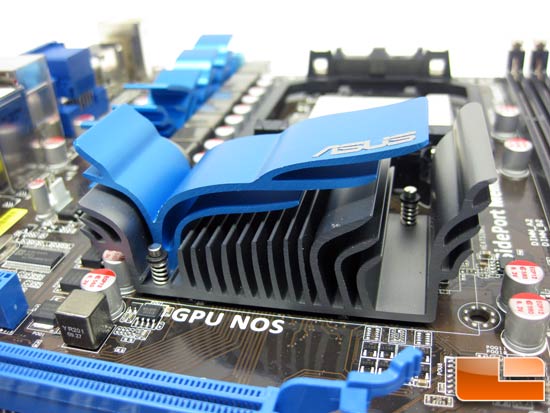
ASUS M4A785TD-V EVO Motherboard 785G Chipset Heatsink

The heat sink on the AMD 785G chipset is impressive looking with a twin color design that looks like something from the orient. Panas tenggelam pada chipset AMD 785G yang mengesankan melihat dengan desain kembar warna seperti sesuatu dari negara timur. The days of boring old cookie cutter heat sinks have been long gone, but it is still amazing that designers keep coming up with new and innovative cooling solutions. Hari-hari membosankan lama cookie cutter heat sink telah lama hilang, tetapi masih tetap desainer yang luar biasa datang dengan baru yang inovatif dan solusi pendinginan.

Stay tuned for a performance review of this great looking AMD 785G motherboard once it becomes public! Menantikan untuk meninjau kinerja ini besar cari AMD 785G Motherboard setelah menjadi publik!


Sumber Berita :www.beritanet.com

Sejarah Motherboard Intel

Motherboard

From Wikipedia, the free encyclopedia Dari Wikipedia Indonesia, ensiklopedia bebas berbahasa Indonesia

Diagram of a motherboard chipset Diagram dari chipset motherboard

A chipset or chip set refers to a group of integrated circuits , or chips, that are designed to work together. J chipset atau chip set merujuk kepada sekelompok sirkuit terpadu, atau keripik, yang dirancang untuk bekerja bersama-sama. They are usually marketed as a single product. Mereka biasanya dipasarkan sebagai satu produk.

Computers Komputer

In computing , the term chipset is commonly used to refer to a set of specialized chips on a computer 's motherboard or an expansion card . Dalam komputasi, istilah chipset yang biasa digunakan untuk merujuk kepada sekumpulan chip khusus pada komputer 's motherboard atau kartu ekspansi. In personal computers the first chipset for the IBM PC AT was the NEAT chipset by Chips and Technologies for the Intel 80286 CPU. Dalam komputer pribadi pertama chipset untuk IBM PC AT adalah chipset NEAT oleh Chips dan Teknologi untuk Intel 80286 CPU. Based on Intel Pentium -class microprocessors , the term chipset often refers to a specific pair of chips on the motherboard: the northbridge and the southbridge . Berdasarkan Intel Pentium kelas microprocessors, istilah chipset sering merujuk tertentu sepasang chips pada motherboard: di Northbridge dan Southbridge. The northbridge links the CPU to very high-speed devices, especially main memory and graphics controllers , and the southbridge connects to lower-speed peripheral buses (such as PCI or ISA ). Northbridge yang link ke CPU sangat tinggi kecepatan perangkat, terutama memori utama dan grafis pengendali, dan Southbridge menghubungkan ke bawah kecepatan sekeliling bis (seperti PCI atau ISA). In many modern chipsets, the southbridge actually contains some on-chip integrated peripherals , such as Ethernet , USB , and audio devices. Dalam banyak chipset modern, yang sebenarnya berisi beberapa Southbridge pada keping terpadu periferal, seperti Ethernet, USB, dan audio device. A chipset is usually designed to work with a specific family of microprocessors. J chipset biasanya dirancang untuk bekerja dengan keluarga microprocessors spesifik. Because it controls communications between the processor and external devices, the chipset plays a crucial role in determining system performance. Karena kontrol komunikasi antara prosesor dan perangkat eksternal, chipset memainkan peran penting dalam menentukan kinerja sistem.

The manufacturer of a chipset often is independent from the manufacturer of the motherboard. Produsen chipset yang sering independen dari produsen motherboard. Current manufacturers of chipsets for PC-compatible motherboards include NVIDIA , AMD , VIA Technologies , SiS , Intel and Broadcom . Apple computers and Unix workstations from Sun , NeXT , SGI , and others have traditionally used custom-designed chipsets; now that Sun and Apple both have x86 processors in at least some of their lines of products, they have begun to use standard PC chipsets in some of their computers. Sekarang produsen chipset untuk PC yang kompatibel termasuk motherboard NVIDIA, AMD, VIA Technologies, SiS, Intel dan Broadcom. Apple komputer dan Unix workstation dari Minggu, NEXT, SGI, dan lain-lain telah digunakan secara tradisional adat-dirancang chipset; yang sekarang Minggu dan Apple keduanya mempunyai x86 prosesor setidaknya beberapa baris produk mereka, mereka mulai menggunakan PC standar chipset di beberapa komputer mereka. Some server manufacturers also develop custom chipsets for their products. Beberapa server produsen juga mengembangkan chipset kustom untuk produk mereka.

In the 1980s, Chips and Technologies , founded by Gordon Campbell, pioneered the manufacturing of chipsets for PC-compatible computers. Pada tahun 1980-an, Chips dan Teknologi, yang didirikan oleh Gordon Campbell, memelopori manufaktur dari chipset untuk komputer PC yang kompatibel. Computer systems produced since then often share commonly used chipsets, even across widely disparate computing specialties. Sistem komputer yang diproduksi sejak itu sering berbagi chipset yang umum digunakan, bahkan di banyak beda komputasi istimewa. For example, the NCR 53C9x , a low-cost chipset implementing a SCSI interface to storage devices, could be found in Unix machines such as the MIPS Magnum , embedded devices, and personal computers. Misalnya, NCR 53C9x, rendah-biaya chipset melaksanakan SCSI interface ke perangkat penyimpanan data, dapat ditemukan di Unix mesin seperti MIPS Magnum, embedded device, dan komputer pribadi.

In home computers , game consoles and arcade game hardware of the 1980s and 1990s, the term chipset was used for the custom audio and graphics chips. Di rumah komputer, game konsol permainan arcade dan perangkat keras dari tahun 1980-an dan 1990-an, istilah chipset yang digunakan untuk kustom audio dan grafis keripik. Examples include the Commodore Amiga 's Original Chip Set or SEGA 's System 16 chipset. Contoh-contoh termasuk Commodore Amiga 's Asli Chip Atur atau Sega' s Sistem 16 chipset.

[ edit ] Major x86 chipsets and their manufacturers [Sunting] Pusat x86 chipset dan produsen

  • ATI (acquired by AMD in 2006) developed chipsets for Intel [ 1 ] and AMD processors, as well as graphics processors : [ 2 ] ATI (diakuisisi oleh AMD pada tahun 2006) dikembangkan untuk chipset Intel [1] dan prosesor AMD, serta prosesor grafis: [2]
    • Chipsets for AMD processors: Chipset AMD untuk prosesor:
    • Chipsets for Intel processors: Chipset untuk prosesor Intel:
      • ATI CrossFire Xpress 3200 (for Intel Core 2 Duo) ATI CrossFire Xpress 3200 (untuk Intel Core 2 Duo)
      • ATI Radeon Xpress 1250 (with integrated graphics for Notebooks) ATI Radeon Xpress 1250 (dengan grafis terintegrasi untuk Notebook)
      • ATI Radeon Xpress 1100 (with integrated graphics for Notebooks) ATI Radeon Xpress 1100 (dengan grafis terintegrasi untuk Notebook)
      • ATI Radeon Xpress 200, 200M (integrated graphics for Notebooks) ATI Radeon Xpress 200, 200m (grafis terintegrasi untuk Notebook)
      • ATI SB600 Series (southbridge) Seri ATI SB600 (Southbridge)
    • Graphics processors: Prosesor grafis:
      • ATI Radeon HD 3800, HD 3600, HD 3400, HD 2900, HD 2700, HD 2600 XT, HD 2600, HD 2400, HD 2300 ATI Radeon HD 3800, HD 3600, HD 3400, HD 2900, HD 2700, HD 2600 XT, HD 2600, HD 2400, HD 2300
      • ATI Radeon X2300, X1950, X1900, X1800, X1650, X1600, X1550, X1300, X1050 ATI Radeon X2300, X1950, X1900, X1800, X1650, X1600, X1550, X1300, X1050
      • ATI Mobility Radeon HD 3600, HD 3400, HD 2700, HD 2600 XT, HD 2600, HD 2400 XT ATI Mobility Radeon HD 3600, HD 3400, HD 2700, HD 2600 XT, HD 2600, HD 2400 XT
      • ATI Mobility Radeon X2500, X1900, X1800, X1700, X1600, X1450, X1400, X1350, X1300 ATI Mobility Radeon X2500, X1900, X1800, X1700, X1600, X1450, X1400, X1350, X1300
      • ATI Mobility Radeon 9800, 9700, 9600, 9550, 9200, 9000, 7500 ATI Mobility Radeon 9800, 9700, 9600, 9550, 9200, 9000, 7500
      • ATI Mobility Radeon ATI Mobility Radeon
      • ATI Mobility FireGL V7800, V5200, V5000, V3100 ATI Mobility FireGL V7800, V5200, V5000, V3100
      • ATI Mobility FireGL T2 ATI Mobility FireGL T2
      • ATI Mobility FireGL 9000 ATI Mobility FireGL 9000
  • Intel produces chipsets for its own line of processors: [ 3 ] Intel memproduksi sendiri chipset untuk lini prosesor: [3]
    • i845E/GV: Bus 533 MHz, AGP4x, 2GB DDR PC2700 max i845E/GV: Bus 533 MHz, AGP4x, 2GB DDR PC2700 maks
    • i850e, i855G (855GME for the Pentium M ) i850e, i855G (855GME untuk Pentium M)
    • i865G/P: (4 GiB dual-channel DDR, 533 MHz FSB, AGP 8x, serial ATA ) i865G / P: (4 GiB dual channel DDR, 533 MHz FSB, AGP 8x, serial ATA)
    • i875p = optimized i865 i875p = dioptimalkan i865
    • E7205 (for Pentium 4 servers), E7500/E7501/E7505 (for Xeon servers)), E7520/E7525/E7530 (for dual Xeon servers) E7205 (untuk Pentium 4 server), E7500/E7501/E7505 (untuk Xeon server)), E7520/E7525/E7530 (untuk dual Xeon server)
    • 910GML/GMZ, 915GM/PM, 945PM/GM 910GML/GMZ, 915GM/PM, 945PM/GM
    • 910GL, 915P/PL/G/GL/GV, 925X/XE, 945P/PL/G/GZ, 955X (for Pentium D /XE) 910GL, 915P/PL/G/GL/GV, 925X/XE, 945P/PL/G/GZ, 955X (untuk Pentium D / xe)
    • 945GC, 963Q, 965P/G/Q, 975X (for Intel Core 2 Duo ) 945GC, 963Q, 965P/G/Q, 975X (untuk Intel Core 2 Duo)
    • P35 Express (for Intel Core 2 Duo/Quad/Extreme) P35 Express (untuk Intel Core 2 Duo / Quad / Extreme)
    • Intel G31 Express (supports DDR2, officially supports up to 1066 MHz System Bus) Intel G31 Express (mendukung DDR2, secara resmi mendukung hingga 1066 MHz Sistem Bisnis)
    • Intel G33 Express (supports DDR2 and DDR3) Intel G33 Express (mendukung DDR2 dan DDR3)
    • Intel G35 Express (supports only DDR2) [ 4 ] Intel G35 Express (hanya mendukung DDR2) [4]
    • Intel X38 Intel X38
    • Intel X48 Intel X48
    • Intel P43 Intel P43
    • Intel G43 Intel G43
    • Intel P45 Intel P45
    • Intel G45 Intel G45
    • (Q4 2008) Intel X58 (Q4 2008) Intel X58
    • (Q3 2009) Intel PCH (Q3 2009) Intel pch
  • NVIDIA produces chipsets for AMD and Intel processors, as well as graphics processors : [ 5 ] [ 6 ] NVIDIA memproduksi chipset untuk AMD dan Intel prosesor, serta prosesor grafis: [5] [6]
    • Chipsets: Chipset:
      • nForce 1 nForce 1
      • nForce2 : Ultra 400Gb, Ultra 400R, Ultra 400. nForce2: Ultra 400Gb, Ultra 400R, Ultra 400.
      • nForce3 : Go, Professional. nForce3: Menuju, Profesional.
      • nForce4 : SLI Intel, Series AMD, SLI/XE Ultra Intel, Intel x16. nForce4: Intel SLI, Seri AMD, SLI / xe Ultra Intel, Intel x16.
      • nForce 500 : 520, SLI/570/550 AMD, 590SLI AMD, 570 SLI Intel , 590 SLI Intel. nForce 500: 520, SLI/570/550 AMD, 590SLI AMD, Intel SLI 570, SLI 590 Intel.
      • nForce 600 : 650i, SLI/650i Ultra, 680a SLI, 680 SLI/680i LT SLI. nForce 600: 650i, SLI/650i Ultra, 680a SLI, SLI 680 SLI/680i LT.
      • nForce 700 : 780i SLI, 790i SLI nForce 700: 780i SLI, 790i SLI
    • Graphics cards: Kartu grafis:
      • TNT: TNT2 Pro, TNT2 Ultra, TNT2 Model 64 (M64), TNT Model 64 (M64) Pro TNT: Pro TNT2, TNT2 Ultra, TNT2 Model 64 (M64), TNT Model 64 (M64) Pro
      • Vanta, Vanta LT Vanta, vanta LT
      • GeForce 256 GeForce 256
      • GeForce 2 : GTS, Pro, TI, Ultra, MX, MX100, MX200, MX400, MX Integrated graphics GeForce 2: GTS, Pro, TI, Ultra, MX, MX100, MX200, MX400, MX Integrated graphics
      • GeForce 3 : TI200, TI500 GeForce 3: TI200, TI500
      • GeForce 4 : MX 420, MX440, MX440-SE, MX460, MX Integrated graphics, MX 4000, TI 4200, TI4400, TI4600, TI4800, TI4800SE GeForce 4: MX 420, MX440, MX440-SE, MX460, MX Integrated grafis, MX 4000, TI 4200, TI4400, TI4600, TI4800, TI4800SE
      • GeForce 5 : FX5100, FX5200, FX 5200LE, FX 5200 Ultra, FX5500, FX5600, FX5600 Ultra, FX5600 SE, FX5600 XT, FX5700, FX5700 VE, FX5700 Ultra, FX5700 LE, FX5800, FX5800 Ultra, FX5900, FX5900 Ultra, FX5900 XT, FX5900 ZT, FX5950 Ultra, PCX 5300, PCX 5750, PCX 5900 GeForce 5: FX5100, FX5200, FX 5200LE, FX 5200 Ultra, FX5500, FX5600, FX5600 Ultra, FX5600 SE, XT FX5600, FX5700, FX5700 JAKARTA, Ultra FX5700, FX5700 LE, FX5800, FX5800 Ultra, FX5900, FX5900 Ultra, FX5900 XT , ZT FX5900, FX5950 Ultra, PCX 5300, PCX 5750, PCX 5900
      • GeForce 6 : 6100, 6150 LE, 6150, 6200, 6200 LE, 6200 TC, 6200 SE TC, 6500, 6600, 6600 LE, 6600 VE, 6600 GT, 6610 XL, 6700 XL, 6800, 6800 LE, 6800 XE, 6800 XT, 6800 GS, 6800 GT, 6800 Ultra GeForce 6: 6100, 6150 LE, 6150, 6200, 6200 LE, 6200 TC, TC SE 6200, 6500, 6600, 6600 LE, 6600 JAKARTA, 6600 GT, 6610 XL, XL 6700, 6800, 6800 LE, 6800 xe, 6800 XT, 6800 GS, 6800 GT, 6800 Ultra
      • GeForce 7 : 7100 GS, 7200 GS, 7300 LE, 7300 SE, 7300 GS, 7300 GT, 7500 LE, 7600 GS, 7600 GT, 7800 GS, 7800 GT, 7800GTX, 7900 GS, 7900 GTO, 7900 GT, 7900 GTX, 7950 GX2 7 GeForce: 7100 GS, 7200 GS, 7300 LE, 7300 SE, 7300 GS, 7300 GT, 7500 LE, 7600 GS, 7600 GT, 7800 GS, 7800 GT, 7800GTX, 7900 GS, 7900 GTO, 7900 GT, 7900 GTX, 7950 GX2
      • GeForce 8 : 8300 GS, 8400 GS, 8500 GT, 8600 GT, 8600 GTS, 8800 GT, 8800 GTS, 8800 GTX, 8800 Ultra 8 GeForce: 8300 GS, 8400 GS, 8500 GT, 8600 GT, 8600 GTS, 8800 GT, 8800 GTS, 8800 GTX, 8800 Ultra
      • GeForce 9 : 9800GX2 GeForce 9: 9800GX2
      • GeForce 200 : GTX 280, GTX 260, GTX 295 GeForce 200: GTX 280, GTX 260, GTX 295
      • Quadro 2: MXR, DCC, PRO, EX Quadro 2: MXR, DCC, PRO, EX
      • Quadro 4: 200, 400 NVS, 380, 500, 550, 580, 700, 750, 780, 900, 980 XGL Quadro 4: 200, 400 NVS, 380, 500, 550, 580, 700, 750, 780, 900, 980 XGL
      • Quadro FX: 330, 350, 500, 540, 550, 560, 600, 700, 1000, 1100, 1300, 1400, 1500, 2000, 3000, 3000G, 3400, 3450, 3500, 4000 SDI, 4400, 4400G, 4500, 4500SDI, 4500X2, 5500, 5500SDI Quadro FX: 330, 350, 500, 540, 550, 560, 600, 700, 1000, 1100, 1300, 1400, 1500, 2000, 3000, 3000G, 3400, 3450, 3500, 4000 SDI, 4400, 4400G, 4500, 4500SDI, 4500X2, 5500, 5500SDI
      • Quadro NVS: 200, 210s, 280, 280SD, 400, 440, 280PCI, 285 Quadro NVS: 200, 210s, 280, 280SD, 400, 440, 280PCI, 285
  • VIA Technologies produces chipsets for Intel and AMD processors: [ 8 ] VIA Technologies untuk memproduksi chipset Intel dan AMD prosesor: [8]
    • VIA KT133, KT133A VIA KT133, KT133A
    • VIA KT266A: FSB 200/266 MHz, AGP4x VIA KT266A: FSB 200/266 MHz, AGP4x
    • VIA KT333 VIA KT333
    • VIA Apollo KT400A VIA Apollo KT400A
    • VIA P4X400 VIA P4X400
    • VIA K8T400M VIA K8T400M